Make your dream to be programer is happen

Tampilkan postingan dengan label CSS. Tampilkan semua postingan

Cara Membuat Form Validation Dengan HTML5 dan Javascript

 
Cara Membuat Form Validation Dengan HTML5 dan Javascript - Form validation sangat penting untuk menjaga keakuratan data yang masuk sehingga tidak ada spam yang tersimpan di dalam database, untuk melakukan validasi dari sisi user biasanya kita akan menggunakan Javascript sehingga validasi dapat dilakukan tanpa harus submit form.


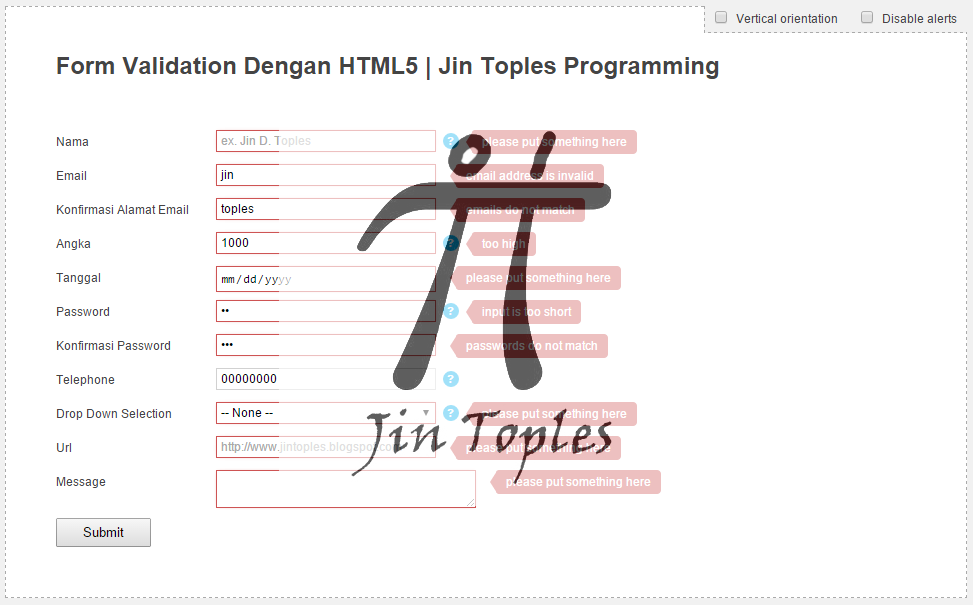
Kali ini kita akan membuat form validation dengan menggabungkan HTML5 dan Javascript. Dengan menggunakan fitur yang disediakan oleh HTML5 kita dapat memvalidasi inputan dari user seperti required field, tipe email, number, URL, max - min character, Dll. tapi kita tidak akan hanya menggunakannya saja tapi memodifikasi tool tip yang muncul dengan menggunakan CSS3 sehingga tooltipnya lebih keren. Lebih jelasnya langsung saja kita ke prakteknya membuat form validation dengan HTML5 dan Javascipt.


Untuk menulisakan script anda dapat menggunakan apa saja bebas, contoh : Notepad, Notepad++, Dreamwaver, NetBeans, Eclipse.

CSS

Pertama buatlah sebuah folder terlebih dahulu dengan nama Form_validation kemudian buatlah sebuah file CSS baru di dalamnya sebgai style form dan tooltipnya dengan nama style.css dengan isi script.

html, body{ height:100%; }
/* body min-width is 992px because it's 960px grid + extra 16px from each side of the header */
body{ min-width:960px; color:#444; background-color:#F1F1F1; font-size:12px; line-height:1.5em; font-family:Arial, Helvetica, sans-serif; }

html, body, div, span, object, iframe,
h1, h2, h3, h4, h5, h6, p, blockquote, pre,
abbr, address, cite, code, del, dfn, em, img, ins, kbd, q, samp,
small, strong, sub, sup, var, b, i, dl, dt, dd, ol, ul, li,
fieldset, form, label, legend,
table, caption, tbody, tfoot, thead, tr, th, td,
article, aside, canvas, details, figcaption, figure,
footer, header, hgroup, menu, nav, section, summary,
time, mark, audio, video {
margin:0;
padding:0;
border:0;
vertical-align:baseline;
}

small{ font-size:0.9em; }

article, aside, details, figcaption, figure,
footer, header, hgroup, menu, nav, section {
display:block;
}

h1{ font-size:2em; margin:0 0 50px 0; }
button{ cursor:pointer; }
p{ padding:5px 0; }

a{ text-decoration:none; }
.btn{ margin:5px; font-size:1.3em; font-weight:bold; border:2px solid rgba(0,0,0,0.2); display:inline-block; box-shadow:0 -30px 30px -15px #00329B inset, 0 1px 0 rgba(255,255,255,0.3) inset; background:#0088CC; background-repeat:repeat-x; color:#FFF; text-shadow:0 -1px 0 rgba(0, 0, 0, 0.25); border-radius:7px; padding:10px 20px; -webkit-transition:0.15s; transition:0.15s; }
.btn:hover{ background:#0068BA; }
.btn:active{ box-shadow:0 0 0 0 rgba(0, 0, 0, 0.3), 0 -30px 30px -15px #00329B inset, 0 0 6px #00243F inset; }
.btn.github{ float:right; }

#wrap{ padding:50px; width:860px; background-color:#FFF; margin:20px auto; border:1px dashed #AAA; position:relative; }
.options{ position:absolute; top:-1px; right:-1px; background-color:#F1F1F1; padding:4px 0; border-left:1px dashed #AAA; border-bottom:1px dashed #AAA; }
.options label{ cursor:pointer; margin:0 10px; }

input, textarea{ border:1px solid #D1D1D1; }
input, select{ font-size:inherit; margin:0; }
input:focus, textarea:focus{ border-color:#AAA; }

input[type=number]::-webkit-inner-spin-button, input[type=number]::-webkit-outer-spin-button { -webkit-appearance:none; margin:0; }
input[type=checkbox]{ border:none; bottom:-1px; cursor:pointer; margin:0 5px 0 0; position:relative; }
button[type=submit]{ font-size:1.1em; padding:5px 25px; }

/* Tooltips helpers */
.item .tooltip{ float:left; top:2px; left:7px; position:relative; z-index:2; }
.item .tooltip:hover{ z-index:3; }
.item .tooltip > span{ display:inline-block; width:16px; height:16px; line-height:16px; font-size:0.9em; font-weight:bold; text-align:center; color:#FFF; cursor:help; background-color:#00AEEF; position:relative; border-radius:10px; }
.item .tooltip .content{ opacity:0; width:200px; background-color:#333; color:#FFF; font-size:0.9em; position:absolute; top:0; left:20px; padding:8px; border-radius:6px; pointer-events:none; transition:0.2s cubic-bezier(0.1, 0.1, 0.25, 2); -webkit-transition:0.3s cubic-bezier(0.1, 0.2, 0.5, 2.2); -moz-transition:0.3s cubic-bezier(0.1, 0.2, 0.5, 2.2); }
.item .tooltip p{ padding:0; }
.item .tooltip.down .content{ left:auto; right:0; top:30px; }
.item .tooltip:hover .content{ opacity:1; left:36px; }
.item .tooltip .content b{ height:0; width:0; border-color:#333 #333 transparent transparent; border-style:solid; border-width:9px 7px; position:absolute; left:-14px; top:8px; }
.item .tooltip.down .content b{ left:auto; right:6px; top:-10px; border-width:5px; border-color:transparent #333 #333 transparent; }

/* alerts (when validation fails) */
.item .alert{ float:left; margin:0 0 0 20px; padding:3px 10px; position:relative; color:#FFF; border-radius:3px 4px 4px 3px; background-color:#CE5454; max-width:170px; white-space:pre; z-index:1; }
.item .alert::after{ content:''; display:block; height:0; width:0; border-color:transparent #CE5454 transparent transparent; border-style:solid; border-width:11px 7px; position:absolute; left:-13px; top:1px; }

@keyframes shake{
25%{ transform:translateX(-6px); }
75%{ transform:translateX(6px); }
}
@-webkit-keyframes shake{
25%{ -webkit-transform:translateX(-6px); }
75%{ -webkit-transform:translateX(6px); }
}

form fieldset{ clear:both; margin:0 0 10px 0; }
form .item{ padding:5px 0; position:relative; height:2em; }
form .item.items{ height:auto; }
.item label{ float:left; }
.item label span{ float:left; width:160px; text-transform:capitalize; line-height:2em; }
.item input, .item textarea{ float:left; padding:3px 4px; width:210px; -webkit-transition:0.2s; -moz-transition:0.2s; transition:0.2s; }
.item input{ }
.item input.short{ width:90px; }
.item input:focus:not([type="checkbox"]), .item textarea:focus{ box-shadow:0 0 4px #00AEEF; border:1px solid #00AEEF; }
.item textarea{ }
.item select{ float:left; width:220px; padding:2px 0; margin:0; border:1px solid #CCC; text-transform:capitalize; }
.item select option{ padding:1px; }

.item > .extra{ float:left; font-size:0.9em; color:#999; line-height:2em; margin-left:13px; }

.item.multi .input{ float:left; }
.item.multi input{ float:left; margin-right:5px; width:35px; text-align:center; }
form .item.multi input:nth-last-child(-n+2){ margin:0; }
.item.items input{ border-top:5px solid #E1E1E1; margin:0 0 0 160px; }

.bad input[required=required], .bad input.optional, .bad select, .bad textarea{ border:1px solid #CE5454; box-shadow:0 0 4px -2px #CE5454; position:relative; left:0; -moz-animation:.3s 2 shake linear; -webkit-animation:0.3s 2 shake linear; }

/* mode2 - where the label's text is above the field and not next to it
--------------------------------------------------------------------------- */
.mode2 .item{ float:left; clear:left; margin-bottom:30px; height:auto; padding:0; zoom:1; }
.mode2 .item.bad{ margin-bottom:8px; }
.mode2 .item::before, .mode2 .item::after{ content:''; display:table; }
.mode2 .item::after{ clear:both; }
.mode2 .item label{ }
.mode2 .item label span{ float:none; display:block; line-height:inherit; }
.mode2 .item input, .item textarea{ width:250px; margin:0; }
.mode2 .item textarea{ width:350px; margin:0; }
.mode2 .item select{ width:260px; float:none; }
.mode2 .item.multi label{ float:none; }
.mode2 .item.multi input{ float:left; margin-right:5px; width:35px; text-align:center; }
.mode2 .item .tooltip{ left:auto; position:absolute; right:-22px; top:19px; }
.mode2 .item .alert::after{ display:none; }
.mode2 .item .alert{ float:none; clear:left; margin:0; padding:0 5px; border-radius:0 0 3px 3px; max-width:100%; height:22px; line-height:1.8em; }
.mode2 .item > .extra{ position:absolute; right:0; }

Perhatikan pada baris kode :

/* Tooltips helpers */
.item .tooltip{ float:left; top:2px; left:7px; position:relative; z-index:2; }
.item .tooltip:hover{ z-index:3; }
.item .tooltip > span{ display:inline-block; width:16px; height:16px; line-height:16px; font-size:0.9em; font-weight:bold; text-align:center; color:#FFF; cursor:help; background-color:#00AEEF; position:relative; border-radius:10px; }
.item .tooltip .content{ opacity:0; width:200px; background-color:#333; color:#FFF; font-size:0.9em; position:absolute; top:0; left:20px; padding:8px; border-radius:6px; pointer-events:none; transition:0.2s cubic-bezier(0.1, 0.1, 0.25, 2); -webkit-transition:0.3s cubic-bezier(0.1, 0.2, 0.5, 2.2); -moz-transition:0.3s cubic-bezier(0.1, 0.2, 0.5, 2.2); }
.item .tooltip p{ padding:0; }
.item .tooltip.down .content{ left:auto; right:0; top:30px; }
.item .tooltip:hover .content{ opacity:1; left:36px; }
.item .tooltip .content b{ height:0; width:0; border-color:#333 #333 transparent transparent; border-style:solid; border-width:9px 7px; position:absolute; left:-14px; top:8px; }
.item .tooltip.down .content b{ left:auto; right:6px; top:-10px; border-width:5px; border-color:transparent #333 #333 transparent; }

/* alerts (when validation fails) */
.item .alert{ float:left; margin:0 0 0 20px; padding:3px 10px; position:relative; color:#FFF; border-radius:3px 4px 4px 3px; background-color:#CE5454; max-width:170px; white-space:pre; z-index:1; }
.item .alert::after{ content:''; display:block; height:0; width:0; border-color:transparent #CE5454 transparent transparent; border-style:solid; border-width:11px 7px; position:absolute; left:-13px; top:1px; }

Ini adalah style dari tooltip yang muncul.

Perhatikan pada baris kode berikut :

.mode2 .item{ float:left; clear:left; margin-bottom:30px; height:auto; padding:0; zoom:1; }
.mode2 .item.bad{ margin-bottom:8px; }
.mode2 .item::before, .mode2 .item::after{ content:''; display:table; }
.mode2 .item::after{ clear:both; }
.mode2 .item label{ }
.mode2 .item label span{ float:none; display:block; line-height:inherit; }
.mode2 .item input, .item textarea{ width:250px; margin:0; }
.mode2 .item textarea{ width:350px; margin:0; }
.mode2 .item select{ width:260px; float:none; }
.mode2 .item.multi label{ float:none; }
.mode2 .item.multi input{ float:left; margin-right:5px; width:35px; text-align:center; }
.mode2 .item .tooltip{ left:auto; position:absolute; right:-22px; top:19px; }
.mode2 .item .alert::after{ display:none; }
.mode2 .item .alert{ float:none; clear:left; margin:0; padding:0 5px; border-radius:0 0 3px 3px; max-width:100%; height:22px; line-height:1.8em; }
.mode2 .item > .extra{ position:absolute; right:0; }

Ini untuk style dari mode form vertikal, jadi anda dapat memilih tampilan form anda vertikal atau default.

Javascript

Pertama download dulu jQuery di situs resminya di sini : DOWNLOAD
Letakan dalam folder yang sama. lalu buatlah sebuah file javascript baru dengan nama validator.js letakan dalam folder yang sama dengan isi script :

/*
Validator v1.1.0
(c) Yair Even Or
https://github.com/yairEO/validator

MIT-style license.
*/

var validator = (function($){
var message, tests, checkField, validate, mark, unmark, field, minmax, defaults,
validateWords, lengthRange, lengthLimit, pattern, alertTxt, data,
email_illegalChars = /[\(\)\<\>\,\;\:\\\/\"\[\]]/,
email_filter = /^.+@.+\..{2,3}$/;

/* general text messages
*/
message = {
invalid : 'invalid input',
empty : 'please put something here',
min : 'input is too short',
max : 'input is too long',
number_min : 'too low',
number_max : 'too high',
url : 'invalid URL',
number : 'not a number',
email : 'email address is invalid',
email_repeat : 'emails do not match',
password_repeat : 'passwords do not match',
repeat : 'no match',
complete : 'input is not complete',
select : 'Please select an option'
};

if(!window.console){
console={};
console.log=console.warn=function(){ return; }
}

// defaults
defaults = { alerts:true };

/* Tests for each type of field (including Select element)
*/
tests = {
sameAsPlaceholder : function(a){
return $.fn.placeholder && a.attr('placeholder') !== undefined && data.val == a.prop('placeholder');
},
hasValue : function(a){
if( !a ){
alertTxt = message.empty;
return false;
}
return true;
},
// 'linked' is a special test case for inputs which their values should be equal to each other (ex. confirm email or retype password)
linked : function(a,b){
if( b != a ){
// choose a specific message or a general one
alertTxt = message[data.type + '_repeat'] || message.no_match;
return false;
}
return true;
},
email : function(a){
if ( !email_filter.test( a ) || a.match( email_illegalChars ) ){
alertTxt = a ? message.email : message.empty;
return false;
}
return true;
},
text : function(a){
// make sure there are at least X number of words, each at least 2 chars long.
// for example 'john F kenedy' should be at least 2 words and will pass validation
if( validateWords ){
var words = a.split(' ');
// iterrate on all the words
var wordsLength = function(len){
for( var w = words.length; w--; )
if( words[w].length < len )
return false;
return true;
};

if( words.length < validateWords || !wordsLength(2) ){
alertTxt = message.complete;
return false;
}
return true;
}
if( lengthRange && a.length < lengthRange[0] ){
alertTxt = message.min;
return false;
}

// check if there is max length & field length is greater than the allowed
if( lengthRange && lengthRange[1] && a.length > lengthRange[1] ){
alertTxt = message.max;
return false;
}
// check if the field's value should obey any length limits, and if so, make sure the length of the value is as specified
if( lengthLimit && lengthLimit.length ){
var obeyLimit = false;
while( lengthLimit.length ){
if( lengthLimit.pop() == a.length )
obeyLimit = true;
}
if( !obeyLimit ){
alertTxt = message.complete;
return false;
}
}

if( pattern ){
var regex, jsRegex;
switch( pattern ){
case 'alphanumeric' :
regex = /^[a-z0-9]+$/i;
break;
case 'numeric' :
regex = /^[0-9]+$/i;
break;
case 'phone' :
regex = /^\+?([0-9]|[-|' '])+$/i;
break;
default :
regex = pattern;
}
try{
jsRegex = new RegExp(regex).test(a);
if( a && !jsRegex )
return false;
}
catch(err){
console.log(err, field, 'regex is invalid');
return false;
}
}
return true;
},
number : function(a){
// if not not a number
if( isNaN(parseFloat(a)) && !isFinite(a) ){
alertTxt = message.number;
return false;
}
// not enough numbers
else if( lengthRange && a.length < lengthRange[0] ){
alertTxt = message.min;
return false;
}
// check if there is max length & field length is greater than the allowed
else if( lengthRange && lengthRange[1] && a.length > lengthRange[1] ){
alertTxt = message.max;
return false;
}
else if( minmax[0] && (a|0) < minmax[0] ){
alertTxt = message.number_min;
return false;
}
else if( minmax[1] && (a|0) > minmax[1] ){
alertTxt = message.number_max;
return false;
}
return true;
},
// Date is validated in European format (day,month,year)
date : function(a){
var day, A = a.split(/[-./]/g), i;
// if there is native HTML5 support:
if( field[0].valueAsNumber )
return true;

for( i = A.length; i--; ){
if( isNaN(parseFloat(a)) && !isFinite(a) )
return false;
}
try{
day = new Date(A[2], A[1]-1, A[0]);
if( day.getMonth()+1 == A[1] && day.getDate() == A[0] )
return day;
return false;
}
catch(er){
console.log('date test: ', err);
return false;
}
},
url : function(a){
// minimalistic URL validation
function testUrl(url){
return /^(https?:\/\/)?([\w\d\-_]+\.+[A-Za-z]{2,})+\/?/.test( url );
}
if( !testUrl( a ) ){
console.log(a);
alertTxt = a ? message.url : message.empty;
return false;
}
return true;
},
hidden : function(a){
if( lengthRange && a.length < lengthRange[0] ){
alertTxt = message.min;
return false;
}
if( pattern ){
var regex;
if( pattern == 'alphanumeric' ){
regex = /^[a-z0-9]+$/i;
if( !regex.test(a) ){
return false;
}
}
}
return true;
},
select : function(a){
if( !tests.hasValue(a) ){
alertTxt = message.select;
return false;
}
return true;
}
};

/* marks invalid fields
*/
mark = function( field, text ){
if( !text || !field || !field.length )
return false;

// check if not already marked as a 'bad' record and add the 'alert' object.
// if already is marked as 'bad', then make sure the text is set again because i might change depending on validation
var item = field.parents('.item'),
warning;

if( item.hasClass('bad') ){
if( defaults.alerts )
item.find('.alert').html(text);
}


else if( defaults.alerts ){
warning = $('<div class="alert">').html( text );
item.append( warning );
}

item.removeClass('bad');
// a delay so the "alert" could be transitioned via CSS
setTimeout(function(){
item.addClass('bad');
}, 0);
};
/* un-marks invalid fields
*/
unmark = function( field ){
if( !field || !field.length ){
console.warn('no "field" argument, null or DOM object not found');
return false;
}

field.parents('.item')
.removeClass('bad')
.find('.alert').remove();
};

function testByType(type, value){
if( type == 'tel' )
pattern = pattern || 'phone';

if( !type || type == 'password' || type == 'tel' )
type = 'text';

return tests[type](value);
}

function prepareFieldData(el){
field = $(el);

field.data( 'valid', true ); // initialize validness of field by first checking if it's even filled out of now
field.data( 'type', field.attr('type') ); // every field starts as 'valid=true' until proven otherwise
pattern = el.pattern;
}

/* Validations per-character keypress
*/
function keypress(e){
prepareFieldData(this);

if( e.charCode )
return testByType( data.type, String.fromCharCode(e.charCode) );
}

/* Checks a single form field by it's type and specific (custom) attributes
*/
function checkField(){
// skip testing fields whom their type is not HIDDEN but they are HIDDEN via CSS.
if( this.type !='hidden' && $(this).is(':hidden') )
return true;

prepareFieldData(this);

field.data( 'val', field[0].value.replace(/^\s+|\s+$/g, "") ); // cache the value of the field and trim it
data = field.data();

// Check if there is a specific error message for that field, if not, use the default 'invalid' message
alertTxt = message[field.prop('name')] || message.invalid;

// SELECT / TEXTAREA nodes needs special treatment
if( field[0].nodeName.toLowerCase() === "select" ){
data.type = 'select';
}
if( field[0].nodeName.toLowerCase() === "textarea" ){
data.type = 'text';
}
/* Gather Custom data attributes for specific validation:
*/
validateWords = data['validateWords'] || 0;
lengthRange = data['validateLengthRange'] ? (data['validateLengthRange']+'').split(',') : [1];
lengthLimit = data['validateLength'] ? (data['validateLength']+'').split(',') : false;
minmax = data['validateMinmax'] ? (data['validateMinmax']+'').split(',') : ''; // for type 'number', defines the minimum and/or maximum for the value as a number.

data.valid = tests.hasValue(data.val);
// check if field has any value
if( data.valid ){
/* Validate the field's value is different than the placeholder attribute (and attribute exists)
* this is needed when fixing the placeholders for older browsers which does not support them.
* in this case, make sure the "placeholder" jQuery plugin was even used before proceeding
*/
if( tests.sameAsPlaceholder(field) ){
alertTxt = message.empty;
data.valid = false;
}

// if this field is linked to another field (their values should be the same)
if( data.validateLinked ){
var linkedTo = data['validateLinked'].indexOf('#') == 0 ? $(data['validateLinked']) : $(':input[name=' + data['validateLinked'] + ']');
data.valid = tests.linked( data.val, linkedTo.val() );
}
/* validate by type of field. use 'attr()' is proffered to get the actual value and not what the browsers sees for unsupported types.
*/
else if( data.valid || data.type == 'select' )
data.valid = testByType(data.type, data.val);

// optional fields are only validated if they are not empty
if( field.hasClass('optional') && !data.val )
data.valid = true;
}

// mark / unmark the field, and set the general 'submit' flag accordingly
if( data.valid )
unmark( field );
else{
mark( field, alertTxt );
submit = false;
}

return data.valid;
}

/* vaildates all the REQUIRED fields prior to submiting the form
*/
function checkAll( $form ){
$form = $($form);

if( $form.length == 0 ){
console.warn('element not found');
return false;
}

var that = this,
submit = true, // save the scope
fieldsToCheck = $form.find(':input').filter('[required=required], .required, .optional').not('[disabled=disabled]');

fieldsToCheck.each(function(){
// use an AND operation, so if any of the fields returns 'false' then the submitted result will be also FALSE
submit = submit * checkField.apply(this);
});

return !!submit; // casting the variable to make sure it's a boolean
}

return {
defaults : defaults,
checkField : checkField,
keypress : keypress,
checkAll : checkAll,
mark : mark,
unmark : unmark,
message : message,
tests : tests
}
})(jQuery);

Perhatikan baris kode berikut :

message = {
invalid : 'invalid input',
empty : 'please put something here',
min : 'input is too short',
max : 'input is too long',
number_min : 'too low',
number_max : 'too high',
url : 'invalid URL',
number : 'not a number',
email : 'email address is invalid',
email_repeat : 'emails do not match',
password_repeat : 'passwords do not match',
repeat : 'no match',
complete : 'input is not complete',
select : 'Please select an option'
};

Disinilah anda mensetting pesan yang muncul dalam tooltip anda.

HTML

Terakhir untuk formnya buatlah sebuah file HTML baru dalam folder yang sama dengan nama index.html dengan isi script :

<!DOCTYPE HTML>
<html lang="en">
<head>
<meta charset="UTF-8">
<title>Form Validation Dengan HTML5 | Jin Toples Programming</title>
<link rel="stylesheet" href="style.css" type="text/css" />
</head>
<body>
<div id='wrap'>
<div class='options'>
<label>
<input type='checkbox' id='vfields' />
Vertical orientation
</label>
<label>
<input type='checkbox' id='alerts' />
Disable alerts
</label>
</div>
<h1 title='how forms should be done.'>Form Validation Dengan HTML5 | Jin Toples Programming</h1>
<section class='form'>
<form action="" method="post" novalidate>
<fieldset>
<div class="item">
<label>
<span>Nama</span>
<input data-validate-length-range="2" data-validate-words="1" name="name" placeholder="ex. Jin D. Toples" required="required" type="text" />
</label>
<div class='tooltip help'>
<span>?</span>
<div class='content'>
<b></b>
<p>Paling sedikit 3 huruf</p>
</div>
</div>
</div>
<div class="item">
<label>
<span>email</span>
<input name="email" class='email' required="required" type="email" placeholder="jin@toples.com"/>
</label>
</div>
<div class="item">
<label>
<span>Konfirmasi alamat email</span>
<input type="email" class='email' name="confirm_email" data-validate-linked='email' required='required'>
</label>
</div>
<div class="item">
<label>
<span>Angka</span>
<input type="number" class='number' name="number" data-validate-minmax="1,100" data-validate-pattern="numeric" required='required'>
</label>
<div class='tooltip help'>
<span>?</span>
<div class='content'>
<b></b>
<p>Masukan angka antara 1 s/d 100</p>
</div>
</div>
</div>
<div class="item">
<label>
<span>Tanggal</span>
<input class='date' type="date" name="date" required='required'>
</label>
</div>
<div class="item">
<label>
<span>Password</span>
<input type="password" name="password" data-validate-length-range="6" required='required'>
</label>
<div class='tooltip help'>
<span>?</span>
<div class='content'>
<b></b>
<p>Minimal 6 karakter</p>
</div>
</div>
</div>
<div class="item">
<label>
<span>Konfirmasi password</span>
<input type="password" name="password2" data-validate-linked='password' required='required'>
</label>
</div>
<div class="item">
<label>
<span>Telephone</span>
<input type="tel" class='tel' name="phone" required='required' data-validate-length-range="8,20">
</label>
<div class='tooltip help'>
<span>?</span>
<div class='content'>
<b></b>
<p>Bisa menggunakan karakter '+' sign, dan '-' atau spasi ' '</p>
</div>
</div>
</div>
<div class="item">
<label>
<span>Drop down selection</span>
<select class="required" name="dropdown">
<option value="">-- none --</option>
<option value="o1">Option 1</option>
<option value="o2">Option 2</option>
<option value="o3">Option 3</option>
</select>
</label>
<div class='tooltip help'>
<span>?</span>
<div class='content'>
<b></b>
<p>Wajib memilih salah satu.</p>
</div>
</div>
</div>
<div class="item">
<label>
<span>url</span>
<input name="url" placeholder="http://www.jintoples.blogspot.com" required="required" type="url" />
</label>
</div>
<div class="item">
<label>
<span>message</span>
<textarea required="required" name='message'></textarea>
</label>
</div>
</fieldset>
<button id='send' type='submit'>Submit</button>
</form>
</section>
</div>
<script src="https://ajax.googleapis.com/ajax/libs/jquery/1.9.1/jquery.min.js"></script>
<script src="validator.js"></script>
<script>
// initialize the validator function
validator.message['date'] = 'not a real date';

// validate a field on "blur" event, a 'select' on 'change' event & a '.reuired' classed multifield on 'keyup':
$('form')
.on('blur', 'input[required], input.optional, select.required', validator.checkField)
.on('change', 'select.required', validator.checkField);

$('.multi.required')
.on('keyup', 'input', function(){
validator.checkField.apply( $(this).siblings().last()[0] );
}).on('blur', 'input', function(){
validator.checkField.apply( $(this).siblings().last()[0] );
});

// bind the validation to the form submit event
//$('#send').click('submit');//.prop('disabled', true);

$('form').submit(function(e){
e.preventDefault();
var submit = true;
// evaluate the form using generic validaing
if( !validator.checkAll( $(this) ) ){
submit = false;
}

if( submit )
this.submit();
return false;
});

/* FOR DEMO ONLY */
$('#vfields').change(function(){
$('form').toggleClass('mode2');
}).prop('checked',false);

$('#alerts').change(function(){
validator.defaults.alerts = (this.checked) ? false : true;
if( this.checked )
$('form .alert').remove();
}).prop('checked',false);
</script>
</body>
</html>

Anda dapat mencobanya sekarang dengan cara membukanya di browser anda, disarankan membukanya dengan browser Chrome atau Mozilla, jangan menggunakan IE Bkakakak.... jika di IE tidak jalan saya sudah tidak heran.

Anda dapat mengunduh file jadinya di sini : DOWNLOAD

Author : Tanasa vladut
From : http://cssdeck.com/labs/forms-validation-styling-semantics
Modified By : Jin Toples

Form Validation Dengan HTML5 dan Javascript anda sekarang sudah selesai, baca juga tutorial program HTML dan Javascript lainnya.
Share:

Cara Membuat Sistem Login Keren Dengan PHP

Cara Membuat Sistem Login Keren Dengan PHP

Cara Membuat Sistem Login Keren Dengan PHP - Kali ini kita akan membuat sitem login dengan session yang di sertai dengan fitur logout menggunakan PHP. Sistem login digunakan untuk otentikasi user masuk ke dalam suatu sistem dengan mengirimkan data seperti username atau password yang nantinya di cocokan dengan data yang ada dalam database. Lebih jelasnya langsung ke prakteknya memebuat sistem login dengan PHP.


Untuk menulisakan script anda dapat menggunakan apa saja bebas, contoh : Notepad, Notepad++, Dreamwaver, NetBeans, Eclipse.

Database

Pertama buatlah sebuah database terlebih dahulu dengan nama db_login kemudian buatlah sebuah table di dalamnya dengan nama tbl_login dengan struktur :

NameTypeSizeExtraPrimary
idINT100auto_incrementyes
usernameVARCHAR50

passwordVARCHAR100


Masukan sebuah data untuk kita login :

username : admin
password : admin ( enkripsi password dengan MD5 agar lebih aman )

insert user ke tabel

PHP

Pertama buatlah sebuah folder dengan nama login_keren di dalam webserver anda

login.php

Untuk form loginnya buatlah sebuah file PHP baru dengan nama login.php di dalam folder login_keren dengan isi script :

<!DOCTYPE html>
<head>
<title>Login Form | Jin Toples Programming</title>
<link href="css/style.css" rel="stylesheet" type="text/css">
</head>
<body>
<?php
//ini digunakan untuk mengecek apakah session login username ada
session_start();
if (!empty($_SESSION['username'])) {
//jika ada redirect ke halaman index
header('location:index.php');
}
?>
<div class="login"> <!-- Login -->
<h1>Login to your account</h1>

<form class="form" action="cek_login.php" method="post" action="">
<?php
//kode php ini kita gunakan untuk menampilkan pesan eror
if (!empty($_GET['error'])) {
if ($_GET['error'] == 1) {
echo '<h3 class="error">Username dan Password belum diisi!</h3>';
} else if ($_GET['error'] == 2) {
echo '<h3 class="error">Username belum diisi!</h3>';
} else if ($_GET['error'] == 3) {
echo '<h3 class="error">Password belum diisi!</h3>';
} else if ($_GET['error'] == 4) {
echo '<h3 class="error">Username dan Password tidak terdaftar!</h3>';
}
}
?>
<p class="field">
<input type="text" name="username" placeholder="Username or email" required/>
</p>

<p class="field">
<input type="password" name="password" placeholder="Password" required/>
</p>

<p class="submit"><input class="btn" type="submit" name="commit" value="Login"></p>
</form>
</div> <!--/ Login-->
</body>
</html>

config.php

Untuk koneksi ke database buatlah sebuah file baru dengan nama config.php di dalam folder yang sama.

<?php
//digunakan untuk koneksi ke database
mysql_connect("localhost","root","");
mysql_select_db("db_login");
?>

cek_login.php

Untuk otentikasi data yang di kirimkan dari form login buatlah sebuah file baru dengan nama cek_login.php di dalam folder yang sama.

<?php
//memanggil file koneksi database
include('config.php');

//tangkap data dari form login
$username = $_POST['username'];
$password = $_POST['password'];

//untuk mencegah sql injection
//kita gunakan mysql_real_escape_string
$username = mysql_real_escape_string($username);
$password = MD5(mysql_real_escape_string($password));

//cek data yang dikirim, apakah kosong atau tidak
if (empty($username) && empty($password)) {
//kalau username dan password kosong
header('location:login.php?error=1');
break;
} else if (empty($username)) {
//kalau username saja yang kosong
header('location:login.php?error=2');
break;
} else if (empty($password)) {
//kalau password saja yang kosong
//redirect ke halaman index
header('location:login.php?error=3');
break;
}

//mencari data dengan username dan password yang sama di dalam tabel tbl_user
$q = mysql_query("select * from tbl_user where username='$username' and password='$password'");

//mengecek apakah hasil pencarian data di atas ada
if (mysql_num_rows($q) == 1) {
session_start();
//kalau username dan password sudah terdaftar di database
//buat session dengan nama username dengan isi nama user yang login
$_SESSION['username'] = $username;

//redirect ke halaman index
header('location:index.php');
} else {
//kalau username ataupun password tidak terdaftar di database
header('location:login.php?error=4');
}
?>

cek_session.php

Sekarang untuk mengecek apakah session login username ada atau tidak buatlah sebuah file baru dengan nama cek_session.php di dalam folder yang sama.

<?php 
session_start();
//mengecek apakah session username kosong atau tidak
if (!isset($_SESSION['username']) || empty($_SESSION['username'])) {
//jika kosong redirect ke halaman login
header('location:login.php');
}
?>

index.php

Untuk halaman yang muncul ketika berhasil login buatlah sebuah file baru dengan nama index.php di dalam folder yang sama

<!DOCTYPE html>
<head>
<title>Login Form | Jin Toples Programming</title>
<link href="css/style.css" rel="stylesheet" type="text/css">
</head>
<body>
<?php
//memanggil file cek_session.php
include('cek_session.php');
?>
<div class="login"> <!-- Login -->
<h1>Login Success</h1>
<form class="form" method="post" action="">
<h3 class="sukses">Login Berhasil</h3>
<p class="submit"><a href="logout.php"><input class="btn" type="button" name="commit" value="Logout"></a></p>
</form>
</div> <!--/ Login-->
</body>
</html>


Logout.php

Terakhir untuk menghapus semua session yang ada atau logout buat sebuah file baru dengan nama logout.php di dalam folder yang sama.

<?php
//lanjutkan session yang sudah dibuat sebelumnya
session_start();

//hapus session yang sudah dibuat
session_destroy();

//redirect ke halaman login
header('location:login.php');
?>

Css

Terakhir untuk mempercanti tampilann form anda agar lebih keren buat sebuah folder baru dengan nama CSS di dalam folder login_keren kemudian buatlah sebuah file CSS di dalamnya dengan nama style.css

body {
font: 13px/20px "Open Sans", Tahoma, Verdana, sans-serif;
color: #a7a599;
background: #31302b;
}

/* === Form === */
.form {
width: 100%;
}

.form .field {
text-align: center;
}

.form .field i {
font-size: 14px;
left: 0px;
top: 0px;
position: absolute;
height: 44px;
width: 44px;
color: #f7f3eb;
background: #676056;
text-align: center;
line-height: 44px;
transition: all 0.3s ease-out;
pointer-events: none;
}

/* === Login === */
.login {
position: relative;
margin: 150px auto;
width: 500px;
background: white;
border-radius: 3px;
}

.login:before {
content: '';
position: absolute;
top: -8px;
right: -8px;
bottom: -8px;
left: -8px;
z-index: -1;
background: rgba(255, 255, 255, 0.1);
border-radius: 4px;
}

.login h1 {
line-height: 55px;
font-size: 18px;
font-weight: bold;
font-family: 'Open Sans', sans-serif;
text-transform: uppercase;
color: #fff;
text-align: center;
background: #f2672e;

-webkit-border-top-left-radius: 3px;
-webkit-border-top-right-radius: 3px;
-moz-border-radius-topleft: 3px;
-moz-border-radius-topright: 3px;
border-top-left-radius: 3px;
border-top-right-radius: 3px;
}

.error {
text-align: center;
margin: 10px 0px;
font-size: 20px;
background: #f2dede;
color: #a94442;
padding: 20px 0px;
}

.sukses{
text-align: center;
margin: 10px 0px;
font-size: 20px;
background: #dff0d8;
color: #3c763d;
padding: 20px 0px;
}

.login p:first-child {
margin-top: 30px;
}

.login p.submit {
text-align: center;
}

/* === Input Form === */
::-webkit-input-placeholder {
color: #ded9cf;
font-family:'Open Sans';
}

:-moz-placeholder {
color: #ded9cf !important;
font-family:'Open Sans';
}

.form input[type=text],
.form input[type=password] {
font-family: 'Open Sans', Calibri, Arial, sans-serif;
font-size: 18px;
font-weight: 400;
padding: 20px 15px 20px 15px;
position: relative;
width: 72%;
height: 24px;
color: #676056;
border: none;
background: #f7f3eb;
color: #777;
transition: color 0.3s ease-out;
}

.form input[type=text] {
margin-bottom: 15px;
}

.form input[type=text]:hover ~ i,
.form input[type=password]:hover ~ i {
color: #ded9cf;
}

.form input[type=text]:focus ~ i,
.form input[type=password]:focus ~ i {
color: #f2672e;
}

.form input[type=text]:focus,
.form input[type=password]:focus,
.btn {
outline: none;
}

.btn {
margin-top: 15px;
width: 80%;
text-align: center;
font-size: 14px;
font-family: 'Open Sans',sans-serif;
font-weight: bold;
padding: 18px 0;
letter-spacing: 0;
-webkit-box-shadow: inset 0px 0px 0px 0px rgba(204,86,15,1);
-moz-box-shadow: inset 0px 0px 0px 0px rgba(204,86,15,1);
box-shadow: inset 0px 0px 0px 0px rgba(204,86,15,1);
color: #fff;
background-color: #f2672e;
text-shadow: none;
text-transform: uppercase;
border: none;
cursor: pointer;
position: relative;
margin-bottom: 20px;
-webkit-animation: shadowFadeOut 0.4s;
-moz-animation: shadowFadeOut 0.4s;
}

.btn:hover,.btn:focus{
color: #fff;
-webkit-box-shadow: inset 0px 54px 0px 0px rgba(204,86,15,1);
-moz-box-shadow: inset 0px 54px 0px 0px rgba(204,86,15,1);
box-shadow: inset 0px 54px 0px 0px rgba(204,86,15,1);
-webkit-animation: shadowFade 0.4s;
-moz-animation: shadowFade 0.4s;
}

@keyframes shadowFade {
0% {
-webkit-box-shadow: inset 0px 0px 0px 0px rgba(204,86,15,1);
-moz-box-shadow: inset 0px 0px 0px 0px rgba(204,86,15,1);
box-shadow: inset 0px 0px 0px 0px rgba(204,86,15,1);
color: #fff;
}
100% {
-webkit-box-shadow: inset 0px 54px 0px 0px rgba(204,86,15,1);
-moz-box-shadow: inset 0px 54px 0px 0px rgba(204,86,15,1);
box-shadow: inset 0px 54px 0px 0px rgba(204,86,15,1);
color: #fff;
}
}

@keyframes shadowFadeOut {
0% {
-webkit-box-shadow: inset 0px 54px 0px 0px rgba(204,86,15,1);
-moz-box-shadow: inset 0px 54px 0px 0px rgba(204,86,15,1);
box-shadow: inset 0px 54px 0px 0px rgba(204,86,15,1);
color: #fff;
}
100% {
-webkit-box-shadow: inset 0px 0px 0px 0px rgba(204,86,15,1);
-moz-box-shadow: inset 0px 0px 0px 0px rgba(204,86,15,1);
box-shadow: inset 0px 0px 0px 0px rgba(204,86,15,1);
color: #fff;
}
}

@-webkit-keyframes shadowFade {
0% {
-webkit-box-shadow: inset 0px 0px 0px 0px rgba(204,86,15,1);
-moz-box-shadow: inset 0px 0px 0px 0px rgba(204,86,15,1);
box-shadow: inset 0px 0px 0px 0px rgba(204,86,15,1);
color: #fff;
}
100% {
-webkit-box-shadow: inset 0px 54px 0px 0px rgba(204,86,15,1);
-moz-box-shadow: inset 0px 54px 0px 0px rgba(204,86,15,1);
box-shadow: inset 0px 54px 0px 0px rgba(204,86,15,1);
color: #fff;
}
}

@-webkit-keyframes shadowFadeOut {
0% {
-webkit-box-shadow: inset 0px 54px 0px 0px rgba(204,86,15,1);
-moz-box-shadow: inset 0px 54px 0px 0px rgba(204,86,15,1);
box-shadow: inset 0px 54px 0px 0px rgba(204,86,15,1);
color: #fff;
}
100% {
-webkit-box-shadow: inset 0px 0px 0px 0px rgba(204,86,15,1);
-moz-box-shadow: inset 0px 0px 0px 0px rgba(204,86,15,1);
box-shadow: inset 0px 0px 0px 0px rgba(204,86,15,1);
color: #fff;
}
}

@-moz-keyframes shadowFade {
0% {
-webkit-box-shadow: inset 0px 0px 0px 0px rgba(204,86,15,1);
-moz-box-shadow: inset 0px 0px 0px 0px rgba(204,86,15,1);
box-shadow: inset 0px 0px 0px 0px rgba(204,86,15,1);
color: #fff;
}
100% {
-webkit-box-shadow: inset 0px 54px 0px 0px rgba(204,86,15,1);
-moz-box-shadow: inset 0px 54px 0px 0px rgba(204,86,15,1);
box-shadow: inset 0px 54px 0px 0px rgba(204,86,15,1);
color: #fff;
}
}

@-moz-keyframes shadowFadeOut {
0% {
-webkit-box-shadow: inset 0px 54px 0px 0px rgba(204,86,15,1);
-moz-box-shadow: inset 0px 54px 0px 0px rgba(204,86,15,1);
box-shadow: inset 0px 54px 0px 0px rgba(204,86,15,1);
color: #fff;
}
100% {
-webkit-box-shadow: inset 0px 0px 0px 0px rgba(204,86,15,1);
-moz-box-shadow: inset 0px 0px 0px 0px rgba(204,86,15,1);
box-shadow: inset 0px 0px 0px 0px rgba(204,86,15,1);
color: #fff;
}
}

Anda sekarang dapat mencobanya anda dengan cara membukanya di browser anda, dengan mengetikan url :

http://localhost/login_keren

Cobalah anda login dengan menggunakan username : admin password : admin.

Anda dapat mengunduh file jadinya di sini : DOWNLOAD

Sistem Login Keren Dengan PHP anda sekarang sudah selesai, baca juga tutorial program PHP lainnya.
Share:

Cara Membuat Contact Form Keren Dengan HTML5

 Cara Membuat Contact Form Keren Dengan HTML5

Cara Membuat Contact Form Keren Dengan HTML5 - Contact form adalah formulir form yang digunakan pengunjung untuk mengirimkan pesan kepada pemilik website. Contact form atau form kontak sangat penting untuk sebuah website sebagai media penghubung antara pengunjung dan pemilik website, hal ini memudahkan pengunjung untuk memberikan pendapat feed back ke pemilik website.


Kali ini kita akan membuat contact form keren dengan HTML5 dan CSS untuk lebih jelasnya langsung saja kita meluncur ke prakteknya.

Pertama buatlah sebuah folder dengan nama Contact_Form

Untuk menulisakan script anda dapat menggunakan apa saja bebas, contoh : Notepad, Notepad++, Dreamwaver, NetBeans, Eclipse.

CSS

Pertama untuk style kontak formnya buatlah sebuah file CSS di dalam folder contact_form dengan nama style.css dengan isi script :

@import url(http://fonts.googleapis.com/css?family=Lato:300,400,700);

body {
background: #f29107;
color: #fff;
font-weight: 400;
font-size: 1em;
font-family: 'Lato', Arial, sans-serif;
margin:0;
padding:0;
padding-bottom:60px;
}
.wrapper{
width:70%;
margin:auto;
}
.ccheader {
margin: 0 auto;
padding: 2em;
text-align: center;
}

.ccheader h1 {
margin: 0;
font-weight: 300;
font-size: 2.5em;
line-height: 1.3;
}
.ccheader {
margin: 0 auto;
padding: 2em;
text-align: center;
}

.ccheader h1 {
margin: 0;
font-weight: 300;
font-size: 2.5em;
line-height: 1.3;
}

/* Form CSS*/
.ccform {
margin: 0 auto;
}
.ccfield-prepend{
margin-bottom:10px;
width:100%;
}

.ccform-addon{
color:#f8ae45;
float:left;
padding:8px;
width:8%;
min-width: 35px;
background:#FFFFFF;
text-align:center;
display: block;
}

.ccformfield {
color:#000000;
background:#FFFFFF;
border:none;
padding:15.5px;
width:100%;
display:block;
font-family: 'Lato',Arial,sans-serif;
font-size:14px;
}

.ccbtn{
display:block;
border:none;
background:#f8ae45;
float:right;
color:#FFFFFF;
padding:10px;
cursor:pointer;
text-decoration:none;
font-weight:bold;
}
.ccbtn:hover{
background:#d8850e;

}

HTML

Terakhir untuk markupnya buatlah sebuah file HTML di dalam folder contact_form dengan nama index.html dengan isi script :

<!doctype html>
<html>
<head>
<title>HTML5 Contact Form | Jin Toples Programming</title>
<link href="http://netdna.bootstrapcdn.com/font-awesome/4.0.3/css/font-awesome.css" rel="stylesheet">
<link href="style.css" rel="stylesheet">
</head>
<body>

<header class="ccheader">
<h1>HTML5 Contact Form</h1>
</header>
<div class="wrapper">
<form method="post" action="" class="ccform">
<div class="ccfield-prepend">
<span class="ccform-addon"><i class="fa fa-user fa-2x"></i></span>
<input class="ccformfield" type="text" placeholder="Full Name" required>
</div>
<div class="ccfield-prepend">
<span class="ccform-addon"><i class="fa fa-envelope fa-2x"></i></span>
<input class="ccformfield" type="email" placeholder="Email" required>
</div>
<div class="ccfield-prepend">
<span class="ccform-addon"><i class="fa fa-mobile-phone fa-2x"></i></span>
<input class="ccformfield" type="number" placeholder="Phone">
</div>
<div class="ccfield-prepend">
<span class="ccform-addon"><i class="fa fa-info fa-2x"></i></span>
<input class="ccformfield" type="text" placeholder="Subject" required>
</div>
<div class="ccfield-prepend">
<span class="ccform-addon"><i class="fa fa-comment fa-2x"></i></span>
<textarea class="ccformfield" name="comments" rows="8" placeholder="Message" required></textarea>
</div>
<div class="ccfield-prepend">
<input class="ccbtn" type="submit" value="Submit">
</div>
</form>
</div>
</body>
</html>

Anda sekarang dapat mencobanya anda dengan cara membukanya di browser anda, disarankan membukanya dengan browser Chrome atau Mozilla, jangan menggunakan IE Bkakakak.... jika di IE tidak jalan saya sudah tidak heran.

Untuk sekarang hanya tampilannya saja, untuk selanjutnya kita akan mengitegrasikannya dengan Email, PHP dan Database.

Baca di sini : Cara Membuat Contact Form Website Keren Dengan PHP


Anda dapat mengunduh file jadinya di sini : DOWNLOAD

Author : CODECONVEY
From : http://codeconvey.com/2014/02/22/creating-simple-html5-contact-form/
Modified By : Jin Toples

Contact Form Keren Dengan HTML5 anda sudah selesai, baca juga tutorial HTML5 dan CSS lainnya.
Share:

Cara Membuat Sticky Table Headers Dengan jQuery

Cara Membuat Sticky Table Headers Dengan jQuery

Cara Membuat Sticky Table Headers Dengan jQuery - Kali ini Kita akan membuat Sticky Table Headers Dengan jQuery, Sticky Table Headers adalah header yang melayang di atas atau menempel di atas ketika header tabel sudah tidak terlihat di layar hal ini digunakan untuk mengatasi jumlah baris tabel yang panjang sehingga meskupun kita di bagian yang harusnya header tabel sudah terlihat kita tetap dapat melihatnya.

Baca juga : Cara Membuat Game Circle Maze Dengan HTML5

Untuk menulisakan script anda dapat menggunakan apa saja bebas, contoh : Notepad, Notepad++, Dreamwaver, NetBeans, Eclipse.

jQuery

Pertama buatlah sebuah folder terlebih dahulu dengan nama Sticky_table buatlah lagi sebuah folder baru dengan nama js di dalamnya lalu
Download jQuery dari situs resminya di sini : DOWNLOAD
Download jQuery throttle di sini : DOWNLOAD ( CTRL + S )
Letakan keduanya dalam folder js kemudian buatlah sebuah file javascript baru dengan nama jquery.stickyheader.js di dalam folder js dengan isi script :

$(function(){
$('table').each(function() {
if($(this).find('thead').length > 0 && $(this).find('th').length > 0) {
// Clone <thead>
var $w = $(window),
$t = $(this),
$thead = $t.find('thead').clone(),
$col = $t.find('thead, tbody').clone();

// Add class, remove margins, reset width and wrap table
$t
.addClass('sticky-enabled')
.css({
margin: 0,
width: '100%'
}).wrap('<div class="sticky-wrap" />');

if($t.hasClass('overflow-y')) $t.removeClass('overflow-y').parent().addClass('overflow-y');

// Create new sticky table head (basic)
$t.after('<table class="sticky-thead" />');

// If <tbody> contains <th>, then we create sticky column and intersect (advanced)
if($t.find('tbody th').length > 0) {
$t.after('<table class="sticky-col" /><table class="sticky-intersect" />');
}

// Create shorthand for things
var $stickyHead = $(this).siblings('.sticky-thead'),
$stickyCol = $(this).siblings('.sticky-col'),
$stickyInsct = $(this).siblings('.sticky-intersect'),
$stickyWrap = $(this).parent('.sticky-wrap');

$stickyHead.append($thead);

$stickyCol
.append($col)
.find('thead th:gt(0)').remove()
.end()
.find('tbody td').remove();

$stickyInsct.html('<thead><tr><th>'+$t.find('thead th:first-child').html()+'</th></tr></thead>');

// Set widths
var setWidths = function () {
$t
.find('thead th').each(function (i) {
$stickyHead.find('th').eq(i).width($(this).width());
})
.end()
.find('tr').each(function (i) {
$stickyCol.find('tr').eq(i).height($(this).height());
});

// Set width of sticky table head
$stickyHead.width($t.width());

// Set width of sticky table col
$stickyCol.find('th').add($stickyInsct.find('th')).width($t.find('thead th').width())
},
repositionStickyHead = function () {
// Return value of calculated allowance
var allowance = calcAllowance();

// Check if wrapper parent is overflowing along the y-axis
if($t.height() > $stickyWrap.height()) {
// If it is overflowing (advanced layout)
// Position sticky header based on wrapper scrollTop()
if($stickyWrap.scrollTop() > 0) {
// When top of wrapping parent is out of view
$stickyHead.add($stickyInsct).css({
opacity: 1,
top: $stickyWrap.scrollTop()
});
} else {
// When top of wrapping parent is in view
$stickyHead.add($stickyInsct).css({
opacity: 0,
top: 0
});
}
} else {
// If it is not overflowing (basic layout)
// Position sticky header based on viewport scrollTop
if($w.scrollTop() > $t.offset().top && $w.scrollTop() < $t.offset().top + $t.outerHeight() - allowance) {
// When top of viewport is in the table itself
$stickyHead.add($stickyInsct).css({
opacity: 1,
top: $w.scrollTop() - $t.offset().top
});
} else {
// When top of viewport is above or below table
$stickyHead.add($stickyInsct).css({
opacity: 0,
top: 0
});
}
}
},
repositionStickyCol = function () {
if($stickyWrap.scrollLeft() > 0) {
// When left of wrapping parent is out of view
$stickyCol.add($stickyInsct).css({
opacity: 1,
left: $stickyWrap.scrollLeft()
});
} else {
// When left of wrapping parent is in view
$stickyCol
.css({ opacity: 0 })
.add($stickyInsct).css({ left: 0 });
}
},
calcAllowance = function () {
var a = 0;
// Calculate allowance
$t.find('tbody tr:lt(3)').each(function () {
a += $(this).height();
});

// Set fail safe limit (last three row might be too tall)
// Set arbitrary limit at 0.25 of viewport height, or you can use an arbitrary pixel value
if(a > $w.height()*0.25) {
a = $w.height()*0.25;
}

// Add the height of sticky header
a += $stickyHead.height();
return a;
};

setWidths();

$t.parent('.sticky-wrap').scroll($.throttle(250, function() {
repositionStickyHead();
repositionStickyCol();
}));

$w
.load(setWidths)
.resize($.debounce(250, function () {
setWidths();
repositionStickyHead();
repositionStickyCol();
}))
.scroll($.throttle(250, repositionStickyHead));
}
});
});

Script ini lah yang nantinya membuat header tabel anda melayang di atas ketika di scroll.

CSS

Buatlah sebuah folder lagi di dalam Sticky_table dengan nama CSS kemudian buatlah sebuah file CSS baru di dalamnya dengan nama style.css dengan isi script :

*, *:after, *:before { -webkit-box-sizing: border-box; -moz-box-sizing: border-box; box-sizing: border-box; }

body {
font-family: 'Lato', Arial, sans-serif;
color: #7c8d87;
background: #f8f8f8;
}

a {
color: #31bc86;
text-decoration: none;
}

a:hover, a:focus {
color: #7c8d87;
}

.container > header {
margin: 0 auto;
padding: 2em;
text-align: center;
background: rgba(0,0,0,0.01);
}

.container > header h1 {
font-size: 2.625em;
line-height: 1.3;
margin: 0;
font-weight: 300;
}

.container > header span {
display: block;
font-size: 60%;
opacity: 0.7;
padding: 0 0 0.6em 0.1em;
}

.component {
line-height: 1.5em;
margin: 0 auto;
padding: 2em 0 3em;
width: 90%;
max-width: 1000px;
overflow: hidden;
}
.component .filler {
font-family: "Blokk", Arial, sans-serif;
color: #d3d3d3;
}
table {
border-collapse: collapse;
margin-bottom: 3em;
width: 100%;
background: #fff;
}
td, th {
padding: 0.75em 1.5em;
text-align: left;
}
td.err {
background-color: #e992b9;
color: #fff;
font-size: 0.75em;
text-align: center;
line-height: 1;
}
th {
background-color: #31bc86;
font-weight: bold;
color: #fff;
white-space: nowrap;
}
tbody th {
background-color: #2ea879;
}
tbody tr:nth-child(2n-1) {
background-color: #f5f5f5;
transition: all .125s ease-in-out;
}
tbody tr:hover {
background-color: rgba(129,208,177,.3);
}

/* For appearance */
.sticky-wrap {
overflow-x: auto;
overflow-y: hidden;
position: relative;
margin: 3em 0;
width: 100%;
}
.sticky-wrap .sticky-thead,
.sticky-wrap .sticky-col,
.sticky-wrap .sticky-intersect {
opacity: 0;
position: absolute;
top: 0;
left: 0;
transition: all .125s ease-in-out;
z-index: 50;
width: auto; /* Prevent table from stretching to full size */
}
.sticky-wrap .sticky-thead {
box-shadow: 0 0.25em 0.1em -0.1em rgba(0,0,0,.125);
z-index: 100;
width: 100%; /* Force stretch */
}
.sticky-wrap .sticky-intersect {
opacity: 1;
z-index: 150;

}
.sticky-wrap .sticky-intersect th {
background-color: #666;
color: #eee;
}
.sticky-wrap td,
.sticky-wrap th {
box-sizing: border-box;
}

/* Not needed for sticky header/column functionality */
td.user-name {
text-transform: capitalize;
}
.sticky-wrap.overflow-y {
overflow-y: auto;
max-height: 50vh;
}

HTML

Terakhir untuk markupnya buatlah sebuah file HTML baru di dalam folder Sticky_table dengan nama index.html dengan isi script :

<!DOCTYPE html>
<html lang="en" class="no-js">
<head>
<meta charset="UTF-8" />
<meta http-equiv="X-UA-Compatible" content="IE=edge,chrome=1">
<meta name="viewport" content="width=device-width, initial-scale=1.0">
<title>Sticky Table Headers Dengan jQuery | Jin Toples Programming</title>
<link rel="stylesheet" type="text/css" href="css/style.css" />
</head>
<body>
<div class="container">
<header>
<h1>Jin Toples Programming<span>Sticky Table Headers Dengan jQuery</span></h1>
</header>
<div class="component">
<h2>Basic usage</h2>
<table>
<thead>
<tr>
<th>Name</th>
<th>Email</th>
<th>Phone</th>
<th>Mobile</th>
</tr>
</thead>
<tbody>
<tr><td class="user-name">gary coleman</td><td class="user-email">gary.coleman21@example.com</td><td class="user-phone">(398)-332-5385</td><td class="user-mobile">(888)-677-3719</td></tr>
<tr><td class="user-name">rose parker</td><td class="user-email">rose.parker16@example.com</td><td class="user-phone">(293)-873-2247</td><td class="user-mobile">(216)-889-4933</td></tr>
<tr><td class="user-name">chloe nelson</td><td class="user-email">chloe.nelson18@example.com</td><td class="user-phone">(957)-213-3499</td><td class="user-mobile">(207)-516-4474</td></tr>
<tr><td class="user-name">eric bell</td><td class="user-email">eric.bell16@example.com</td><td class="user-phone">(897)-762-9782</td><td class="user-mobile">(565)-627-3002</td></tr>
<tr><td class="user-name">douglas hayes</td><td class="user-email">douglas.hayes92@example.com</td><td class="user-phone">(231)-391-6269</td><td class="user-mobile">(790)-838-2130</td></tr>
<tr><td class="user-name">cameron brown</td><td class="user-email">cameron.brown32@example.com</td><td class="user-phone">(204)-488-5204</td><td class="user-mobile">(508)-463-6811</td></tr>
<tr><td class="user-name">nevaeh diaz</td><td class="user-email">nevaeh.diaz99@example.com</td><td class="user-phone">(436)-578-2946</td><td class="user-mobile">(906)-412-3302</td></tr>
<tr><td class="user-name">kathy miller</td><td class="user-email">kathy.miller62@example.com</td><td class="user-phone">(724)-705-3555</td><td class="user-mobile">(764)-841-2531</td></tr>
<tr><td class="user-name">susan king</td><td class="user-email">susan.king88@example.com</td><td class="user-phone">(774)-205-7754</td><td class="user-mobile">(639)-267-9728</td></tr>
<tr><td class="user-name">jeffery ramirez</td><td class="user-email">jeffery.ramirez83@example.com</td><td class="user-phone">(723)-243-7706</td><td class="user-mobile">(172)-597-3422</td></tr>
<tr><td class="user-name">gary coleman</td><td class="user-email">gary.coleman21@example.com</td><td class="user-phone">(398)-332-5385</td><td class="user-mobile">(888)-677-3719</td></tr>
<tr><td class="user-name">rose parker</td><td class="user-email">rose.parker16@example.com</td><td class="user-phone">(293)-873-2247</td><td class="user-mobile">(216)-889-4933</td></tr>
<tr><td class="user-name">chloe nelson</td><td class="user-email">chloe.nelson18@example.com</td><td class="user-phone">(957)-213-3499</td><td class="user-mobile">(207)-516-4474</td></tr>
<tr><td class="user-name">eric bell</td><td class="user-email">eric.bell16@example.com</td><td class="user-phone">(897)-762-9782</td><td class="user-mobile">(565)-627-3002</td></tr>
<tr><td class="user-name">douglas hayes</td><td class="user-email">douglas.hayes92@example.com</td><td class="user-phone">(231)-391-6269</td><td class="user-mobile">(790)-838-2130</td></tr>
<tr><td class="user-name">cameron brown</td><td class="user-email">cameron.brown32@example.com</td><td class="user-phone">(204)-488-5204</td><td class="user-mobile">(508)-463-6811</td></tr>
<tr><td class="user-name">nevaeh diaz</td><td class="user-email">nevaeh.diaz99@example.com</td><td class="user-phone">(436)-578-2946</td><td class="user-mobile">(906)-412-3302</td></tr>
<tr><td class="user-name">kathy miller</td><td class="user-email">kathy.miller62@example.com</td><td class="user-phone">(724)-705-3555</td><td class="user-mobile">(764)-841-2531</td></tr>
<tr><td class="user-name">susan king</td><td class="user-email">susan.king88@example.com</td><td class="user-phone">(774)-205-7754</td><td class="user-mobile">(639)-267-9728</td></tr>
<tr><td class="user-name">jeffery ramirez</td><td class="user-email">jeffery.ramirez83@example.com</td><td class="user-phone">(723)-243-7706</td><td class="user-mobile">(172)-597-3422</td></tr>
<tr><td class="user-name">gary coleman</td><td class="user-email">gary.coleman21@example.com</td><td class="user-phone">(398)-332-5385</td><td class="user-mobile">(888)-677-3719</td></tr>
<tr><td class="user-name">rose parker</td><td class="user-email">rose.parker16@example.com</td><td class="user-phone">(293)-873-2247</td><td class="user-mobile">(216)-889-4933</td></tr>
<tr><td class="user-name">chloe nelson</td><td class="user-email">chloe.nelson18@example.com</td><td class="user-phone">(957)-213-3499</td><td class="user-mobile">(207)-516-4474</td></tr>
<tr><td class="user-name">eric bell</td><td class="user-email">eric.bell16@example.com</td><td class="user-phone">(897)-762-9782</td><td class="user-mobile">(565)-627-3002</td></tr>
<tr><td class="user-name">douglas hayes</td><td class="user-email">douglas.hayes92@example.com</td><td class="user-phone">(231)-391-6269</td><td class="user-mobile">(790)-838-2130</td></tr>
<tr><td class="user-name">cameron brown</td><td class="user-email">cameron.brown32@example.com</td><td class="user-phone">(204)-488-5204</td><td class="user-mobile">(508)-463-6811</td></tr>
<tr><td class="user-name">nevaeh diaz</td><td class="user-email">nevaeh.diaz99@example.com</td><td class="user-phone">(436)-578-2946</td><td class="user-mobile">(906)-412-3302</td></tr>
<tr><td class="user-name">kathy miller</td><td class="user-email">kathy.miller62@example.com</td><td class="user-phone">(724)-705-3555</td><td class="user-mobile">(764)-841-2531</td></tr>
<tr><td class="user-name">susan king</td><td class="user-email">susan.king88@example.com</td><td class="user-phone">(774)-205-7754</td><td class="user-mobile">(639)-267-9728</td></tr>
<tr><td class="user-name">jeffery ramirez</td><td class="user-email">jeffery.ramirez83@example.com</td><td class="user-phone">(723)-243-7706</td><td class="user-mobile">(172)-597-3422</td></tr>
</tbody>
</table>
</div><!-- /container -->
<script src="js/jquery-1.8.3.js"></script>
<script src="js/jquery.ba-throttle-debounce.min.js"></script>
<script src="js/jquery.stickyheader.js"></script>
</body>
</html>

Sticky Table Headers Dengan jQuery anda sudah selesai anda dapat mencobanya dengan cara membukanya di browser anda, disarankan membukanya dengan browser Chrome atau Mozilla, jangan menggunakan IE Bkakakak.... jika di IE tidak jalan saya sudah tidak heran. 

Ada juga beberapa tipe yang berbeda yaitu yang disertai dengan headerr baris dan juga header baris yang sticky header.

Tipe 2

Dengan header baris :

<!DOCTYPE html>
<html lang="en" class="no-js">
<head>
<meta charset="UTF-8" />
<meta http-equiv="X-UA-Compatible" content="IE=edge,chrome=1">
<meta name="viewport" content="width=device-width, initial-scale=1.0">
<title>Sticky Table Headers Dengan jQuery | Jin Toples Programming</title>
<link rel="stylesheet" type="text/css" href="css/style.css" />
</head>
<body>
<div class="container">
<header>
<h1>Jin Toples Programming<span>Sticky Table Headers Dengan jQuery</span></h1>
</header>
<div class="component">
<h2>Biaxial headers</h2>
<p>Biaxial headers are possible &mdash; this is for situations where both horizontal and vertical headers are needed.</p>
<p>The example below has the first cell wrapped in &lt;th&gt; instead of &lt;td&gt;:</p>
<table>
<thead>
<tr>
<th>Sample ID</th>
<th>Reading #1</th>
<th>Reading #2</th>
<th>Reading #3</th>
<th>Reading #4</th>
<th>Reading #5</th>
</tr>
</thead>
<tbody>
<tr>
<th>Sample #1</th>
<td>52</td>
<td>40</td>
<td>9</td>
<td>47</td>
<td>31</td>
</tr>
<tr>
<th>Sample #2</th>
<td>27</td>
<td>55</td>
<td>97</td>
<td>52</td>
<td>19</td>
</tr>
<tr>
<th>Sample #3</th>
<td>36</td>
<td>68</td>
<td>89</td>
<td>78</td>
<td>60</td>
</tr>
<tr>
<th>Sample #4</th>
<td>95</td>
<td>46</td>
<td>62</td>
<td>24</td>
<td>14</td>
</tr>
<tr>
<th>Sample #5</th>
<td>19</td>
<td>66</td>
<td>31</td>
<td>99</td>
<td>77</td>
</tr>
<tr>
<th>Sample #6</th>
<td>57</td>
<td>15</td>
<td>57</td>
<td>9</td>
<td>11</td>
</tr>
<tr>
<th>Sample #7</th>
<td>69</td>
<td>46</td>
<td>16</td>
<td>33</td>
<td>85</td>
</tr>
<tr>
<th>Sample #8</th>
<td>18</td>
<td>93</td>
<td>84</td>
<td>57</td>
<td>35</td>
</tr>
<tr>
<th>Sample #9</th>
<td>92</td>
<td>10</td>
<td>69</td>
<td>35</td>
<td>0</td>
</tr>
<tr>
<th>Sample #10</th>
<td>4</td>
<td>87</td>
<td>51</td>
<td>22</td>
<td>19</td>
</tr>
<tr>
<th>Sample #11</th>
<td>24</td>
<td>23</td>
<td>85</td>
<td>34</td>
<td>83</td>
</tr>
<tr>
<th>Sample #12</th>
<td>92</td>
<td>6</td>
<td>67</td>
<td>65</td>
<td>12</td>
</tr>
<tr>
<th>Sample #13</th>
<td>10</td>
<td>77</td>
<td>64</td>
<td>51</td>
<td>63</td>
</tr>
<tr>
<th>Sample #14</th>
<td>65</td>
<td>85</td>
<td>42</td>
<td>90</td>
<td>94</td>
</tr>
<tr>
<th>Sample #15</th>
<td>34</td>
<td>48</td>
<td>38</td>
<td>6</td>
<td>21</td>
</tr>
<tr>
<th>Sample #16</th>
<td>26</td>
<td>72</td>
<td>47</td>
<td>27</td>
<td>43</td>
</tr>
<tr>
<th>Sample #17</th>
<td>79</td>
<td>86</td>
<td>85</td>
<td>10</td>
<td>10</td>
</tr>
<tr>
<th>Sample #18</th>
<td>39</td>
<td>68</td>
<td>91</td>
<td>71</td>
<td>74</td>
</tr>
<tr>
<th>Sample #19</th>
<td>70</td>
<td>4</td>
<td>59</td>
<td>82</td>
<td>10</td>
</tr>
<tr>
<th>Sample #20</th>
<td>63</td>
<td>16</td>
<td>62</td>
<td>28</td>
<td>13</td>
</tr>
</tbody>
</table>
</div>
</div><!-- /container -->
<script src="http://ajax.googleapis.com/ajax/libs/jquery/1/jquery.min.js"></script>
<script src="http://cdnjs.cloudflare.com/ajax/libs/jquery-throttle-debounce/1.1/jquery.ba-throttle-debounce.min.js"></script>
<script src="js/jquery.stickyheader.js"></script>
</body>
</html>

Tipe 3

Dengan header baris yang scticky :

<!DOCTYPE html>
<html lang="en" class="no-js">
<head>
<meta charset="UTF-8" />
<meta http-equiv="X-UA-Compatible" content="IE=edge,chrome=1">
<meta name="viewport" content="width=device-width, initial-scale=1.0">
<title>Sticky Table Headers Dengan jQuery | Jin Toples Programming</title>
<link rel="stylesheet" type="text/css" href="css/style.css" />
</head>
<body>
<div class="container">
<header>
<h1>Jin Toples Programming<span>Sticky Table Headers Dengan jQuery</span></h1>
</header>
<div class="component">
<h2>Wide tables are also supported.</h2>
<h3>Table set to overflow on the horizontal <em>x</em> axis:</h3>
<p>The table below is allowed to overflow along the x-axis because of excessive width, making data in the rightmost columns inaccessible. This is circumvented by allowing the wrapping parent to overflow.</p>
<table class="">
<thead>
<tr>
<th>Population</th><th>Alpha</th><th>Beta</th><th>Gamma</th><th>Delta</th><th>Epsilon</th><th>Zeta</th><th>Eta</th><th>Theta</th><th>Iota</th><th>Kappa</th><th>Lambda</th><th>Mu</th><th>Nu</th><th>Xi</th><th>Omicron</th><th>Pi</th><th>Rho</th><th>Sigma</th><th>Tau</th><th>Upsilon</th>
</tr>
</thead>
<tbody>
<tr>
<th>Sample #1</th><td>23</td><td>88</td><td>8</td><td>2</td><td>67</td><td>83</td><td>81</td><td>37</td><td>91</td><td>96</td><td>13</td><td>3</td><td>95</td><td>98</td><td>10</td><td>87</td><td>70</td><td>54</td><td>72</td><td>75</td>
</tr><tr>
<th>Sample #2</th><td>14</td><td>21</td><td>20</td><td>21</td><td>9</td><td>68</td><td>60</td><td>73</td><td>22</td><td>29</td><td>9</td><td>49</td><td>49</td><td>66</td><td>58</td><td>10</td><td>8</td><td>24</td><td>19</td><td>65</td>
</tr><tr>
<th>Sample #3</th><td>4</td><td>50</td><td>89</td><td>72</td><td>99</td><td>90</td><td>24</td><td>86</td><td>95</td><td>44</td><td>32</td><td>97</td><td>18</td><td>90</td><td>81</td><td>9</td><td>38</td><td>4</td><td>85</td><td>15</td>
</tr><tr>
<th>Sample #4</th><td>10</td><td class="err">Parse error</td><td>32</td><td>45</td><td>53</td><td>29</td><td>35</td><td>35</td><td>75</td><td>9</td><td>69</td><td>66</td><td>93</td><td>42</td><td>81</td><td>85</td><td>72</td><td>70</td><td>15</td><td>38</td>
</tr><tr>
<th>Sample #5</th><td>85</td><td>42</td><td>71</td><td>56</td><td>30</td><td>3</td><td>41</td><td>87</td><td>94</td><td>99</td><td>24</td><td>20</td><td>96</td><td>62</td><td>90</td><td>13</td><td>38</td><td>47</td><td>9</td><td>6</td>
</tr><tr>
<th>Sample #6</th><td>18</td><td>80</td><td>85</td><td>65</td><td>9</td><td>93</td><td>93</td><td>61</td><td>49</td><td>10</td><td>45</td><td>3</td><td>93</td><td>61</td><td>4</td><td>80</td><td>2</td><td>60</td><td>53</td><td>81</td>
</tr><tr>
<th>Sample #7</th><td>30</td><td>81</td><td>46</td><td>50</td><td>71</td><td>60</td><td>8</td><td>33</td><td>87</td><td>34</td><td>35</td><td>74</td><td>34</td><td>31</td><td>97</td><td>10</td><td>40</td><td>95</td><td>92</td><td>93</td>
</tr><tr>
<th>Sample #8</th><td>23</td><td>88</td><td>8</td><td>2</td><td>67</td><td>83</td><td>81</td><td>37</td><td>91</td><td>96</td><td>13</td><td>3</td><td>95</td><td>98</td><td>10</td><td>87</td><td>70</td><td>54</td><td>72</td><td>75</td>
</tr><tr>
<th>Sample #9</th><td>14</td><td>21</td><td>20</td><td>21</td><td>9</td><td>68</td><td>60</td><td>73</td><td>22</td><td>29</td><td>9</td><td>49</td><td>49</td><td>66</td><td>58</td><td>10</td><td>8</td><td>24</td><td>19</td><td>65</td>
</tr><tr>
<th>Sample #10</th><td>4</td><td>50</td><td>89</td><td>72</td><td>99</td><td>90</td><td>24</td><td>86</td><td>95</td><td>44</td><td>32</td><td>97</td><td>18</td><td>90</td><td>81</td><td>9</td><td>38</td><td>4</td><td>85</td><td>15</td>
</tr><tr>
<th>Sample #11</th><td>10</td><td class="err">Parse error</td><td>32</td><td>45</td><td>53</td><td>29</td><td>35</td><td>35</td><td>75</td><td>9</td><td>69</td><td>66</td><td>93</td><td>42</td><td>81</td><td>85</td><td>72</td><td>70</td><td>15</td><td>38</td>
</tr><tr>
<th>Sample #12</th><td>85</td><td>42</td><td>71</td><td>56</td><td>30</td><td>3</td><td>41</td><td>87</td><td>94</td><td>99</td><td>24</td><td>20</td><td>96</td><td>62</td><td>90</td><td>13</td><td>38</td><td>47</td><td>9</td><td>6</td>
</tr><tr>
<th>Sample #13</th><td>18</td><td>80</td><td>85</td><td>65</td><td>9</td><td>93</td><td>93</td><td>61</td><td>49</td><td>10</td><td>45</td><td>3</td><td>93</td><td>61</td><td>4</td><td>80</td><td>2</td><td>60</td><td>53</td><td>81</td>
</tr><tr>
<th>Sample #14</th><td>30</td><td>81</td><td>46</td><td>50</td><td>71</td><td>60</td><td>8</td><td>33</td><td>87</td><td>34</td><td>35</td><td>74</td><td>34</td><td>31</td><td>97</td><td>10</td><td>40</td><td>95</td><td>92</td><td>93</td>
</tr><tr>
<th>Sample #15</th><td>23</td><td>88</td><td>8</td><td>2</td><td>67</td><td>83</td><td>81</td><td>37</td><td>91</td><td>96</td><td>13</td><td>3</td><td>95</td><td>98</td><td>10</td><td>87</td><td>70</td><td>54</td><td>72</td><td>75</td>
</tr><tr>
<th>Sample #16</th><td>14</td><td>21</td><td>20</td><td>21</td><td>9</td><td>68</td><td>60</td><td>73</td><td>22</td><td>29</td><td>9</td><td>49</td><td>49</td><td>66</td><td>58</td><td>10</td><td>8</td><td>24</td><td>19</td><td>65</td>
</tr><tr>
<th>Sample #17</th><td>4</td><td>50</td><td>89</td><td>72</td><td>99</td><td>90</td><td>24</td><td>86</td><td>95</td><td>44</td><td>32</td><td>97</td><td>18</td><td>90</td><td>81</td><td>9</td><td>38</td><td>4</td><td>85</td><td>15</td>
</tr><tr>
<th>Sample #18</th><td>10</td><td class="err">Parse error</td><td>32</td><td>45</td><td>53</td><td>29</td><td>35</td><td>35</td><td>75</td><td>9</td><td>69</td><td>66</td><td>93</td><td>42</td><td>81</td><td>85</td><td>72</td><td>70</td><td>15</td><td>38</td>
</tr><tr>
<th>Sample #19</th><td>85</td><td>42</td><td>71</td><td>56</td><td>30</td><td>3</td><td>41</td><td>87</td><td>94</td><td>99</td><td>24</td><td>20</td><td>96</td><td>62</td><td>90</td><td>13</td><td>38</td><td>47</td><td>9</td><td>6</td>
</tr><tr>
<th>Sample #20</th><td>18</td><td>80</td><td>85</td><td>65</td><td>9</td><td>93</td><td>93</td><td>61</td><td>49</td><td>10</td><td>45</td><td>3</td><td>93</td><td>61</td><td>4</td><td>80</td><td>2</td><td>60</td><td>53</td><td>81</td>
</tr><tr>
<th>Sample #21</th><td>30</td><td>81</td><td>46</td><td>50</td><td>71</td><td>60</td><td>8</td><td>33</td><td>87</td><td>34</td><td>35</td><td>74</td><td>34</td><td>31</td><td>97</td><td>10</td><td>40</td><td>95</td><td>92</td><td>93</td>
</tr><tr>
<th>Sample #22</th><td>23</td><td>88</td><td>8</td><td>2</td><td>67</td><td>83</td><td>81</td><td>37</td><td>91</td><td>96</td><td>13</td><td>3</td><td>95</td><td>98</td><td>10</td><td>87</td><td>70</td><td>54</td><td>72</td><td>75</td>
</tr><tr>
<th>Sample #23</th><td>14</td><td>21</td><td>20</td><td>21</td><td>9</td><td>68</td><td>60</td><td>73</td><td>22</td><td>29</td><td>9</td><td>49</td><td>49</td><td>66</td><td>58</td><td>10</td><td>8</td><td>24</td><td>19</td><td>65</td>
</tr><tr>
<th>Sample #24</th><td>4</td><td>50</td><td>89</td><td>72</td><td>99</td><td>90</td><td>24</td><td>86</td><td>95</td><td>44</td><td>32</td><td>97</td><td>18</td><td>90</td><td>81</td><td>9</td><td>38</td><td>4</td><td>85</td><td>15</td>
</tr><tr>
<th>Sample #25</th><td>10</td><td class="err">Parse error</td><td>32</td><td>45</td><td>53</td><td>29</td><td>35</td><td>35</td><td>75</td><td>9</td><td>69</td><td>66</td><td>93</td><td>42</td><td>81</td><td>85</td><td>72</td><td>70</td><td>15</td><td>38</td>
</tr><tr>
<th>Sample #26</th><td>85</td><td>42</td><td>71</td><td>56</td><td>30</td><td>3</td><td>41</td><td>87</td><td>94</td><td>99</td><td>24</td><td>20</td><td>96</td><td>62</td><td>90</td><td>13</td><td>38</td><td>47</td><td>9</td><td>6</td>
</tr><tr>
<th>Sample #27</th><td>18</td><td>80</td><td>85</td><td>65</td><td>9</td><td>93</td><td>93</td><td>61</td><td>49</td><td>10</td><td>45</td><td>3</td><td>93</td><td>61</td><td>4</td><td>80</td><td>2</td><td>60</td><td>53</td><td>81</td>
</tr><tr>
<th>Sample #28</th><td>30</td><td>81</td><td>46</td><td>50</td><td>71</td><td>60</td><td>8</td><td>33</td><td>87</td><td>34</td><td>35</td><td>74</td><td>34</td><td>31</td><td>97</td><td>10</td><td>40</td><td>95</td><td>92</td><td>93</td>
</tr>
</tbody>
</table>
<h3>Table set to overflow along both horizontal and vertical (<em>x</em> and <em>y</em>) axes:</h3>
<p>In some situations, when encountered with a very huge data set, it is hard to fit the whole table on the page. In this case, we can selectively allow certain tables to overflow on <strong>both</strong> axis. Since vertical overflow is hidden in basic usage, we can allow this by giving the table an <code>overflow-y: auto</code> property. This property will be detected by the wrapping parent, allowing its content to overflow in both axes.</p>
<table class="overflow-y">
<thead>
<tr>
<th>Population</th><th>Alpha</th><th>Beta</th><th>Gamma</th><th>Delta</th><th>Epsilon</th><th>Zeta</th><th>Eta</th><th>Theta</th><th>Iota</th><th>Kappa</th><th>Lambda</th><th>Mu</th><th>Nu</th><th>Xi</th><th>Omicron</th><th>Pi</th><th>Rho</th><th>Sigma</th><th>Tau</th><th>Upsilon</th>
</tr>
</thead>
<tbody>
<tr>
<th>Sample #1</th><td>23</td><td>88</td><td>8</td><td>2</td><td>67</td><td>83</td><td>81</td><td>37</td><td>91</td><td>96</td><td>13</td><td>3</td><td>95</td><td>98</td><td>10</td><td>87</td><td>70</td><td>54</td><td>72</td><td>75</td>
</tr><tr>
<th>Sample #2</th><td>14</td><td>21</td><td>20</td><td>21</td><td>9</td><td>68</td><td>60</td><td>73</td><td>22</td><td>29</td><td>9</td><td>49</td><td>49</td><td>66</td><td>58</td><td>10</td><td>8</td><td>24</td><td>19</td><td>65</td>
</tr><tr>
<th>Sample #3</th><td>4</td><td>50</td><td>89</td><td>72</td><td>99</td><td>90</td><td>24</td><td>86</td><td>95</td><td>44</td><td>32</td><td>97</td><td>18</td><td>90</td><td>81</td><td>9</td><td>38</td><td>4</td><td>85</td><td>15</td>
</tr><tr>
<th>Sample #4</th><td>10</td><td class="err">Parse error</td><td>32</td><td>45</td><td>53</td><td>29</td><td>35</td><td>35</td><td>75</td><td>9</td><td>69</td><td>66</td><td>93</td><td>42</td><td>81</td><td>85</td><td>72</td><td>70</td><td>15</td><td>38</td>
</tr><tr>
<th>Sample #5</th><td>85</td><td>42</td><td>71</td><td>56</td><td>30</td><td>3</td><td>41</td><td>87</td><td>94</td><td>99</td><td>24</td><td>20</td><td>96</td><td>62</td><td>90</td><td>13</td><td>38</td><td>47</td><td>9</td><td>6</td>
</tr><tr>
<th>Sample #6</th><td>18</td><td>80</td><td>85</td><td>65</td><td>9</td><td>93</td><td>93</td><td>61</td><td>49</td><td>10</td><td>45</td><td>3</td><td>93</td><td>61</td><td>4</td><td>80</td><td>2</td><td>60</td><td>53</td><td>81</td>
</tr><tr>
<th>Sample #7</th><td>30</td><td>81</td><td>46</td><td>50</td><td>71</td><td>60</td><td>8</td><td>33</td><td>87</td><td>34</td><td>35</td><td>74</td><td>34</td><td>31</td><td>97</td><td>10</td><td>40</td><td>95</td><td>92</td><td>93</td>
</tr><tr>
<th>Sample #8</th><td>29</td><td>91</td><td>85</td><td>92</td><td>2</td><td>84</td><td>29</td><td>28</td><td>25</td><td>63</td><td>18</td><td>97</td><td>87</td><td>59</td><td>53</td><td>7</td><td>47</td><td>21</td><td>62</td><td>11</td>
</tr><tr>
<th>Sample #9</th><td>45</td><td>96</td><td>25</td><td>60</td><td>56</td><td>67</td><td>48</td><td>7</td><td>30</td><td>64</td><td>10</td><td>0</td><td>38</td><td>72</td><td>83</td><td>61</td><td>35</td><td>96</td><td>84</td><td>49</td>
</tr><tr>
<th>Sample #10</th><td>66</td><td>63</td><td>25</td><td>28</td><td>67</td><td>83</td><td>25</td><td>10</td><td>0</td><td>18</td><td>98</td><td>92</td><td>73</td><td>40</td><td>78</td><td>88</td><td>99</td><td>30</td><td>74</td><td>88</td>
</tr><tr>
<th>Sample #11</th><td>8</td><td>34</td><td>9</td><td>56</td><td>38</td><td>37</td><td>17</td><td>74</td><td>33</td><td>55</td><td>76</td><td>95</td><td>34</td><td>5</td><td>39</td><td>13</td><td>99</td><td>35</td><td>15</td><td>56</td>
</tr><tr>
<th>Sample #12</th><td>28</td><td>1</td><td>93</td><td>79</td><td>56</td><td>7</td><td>70</td><td>62</td><td>58</td><td>96</td><td>25</td><td>40</td><td>49</td><td>35</td><td>44</td><td>67</td><td>6</td><td>73</td><td>38</td><td>91</td>
</tr><tr>
<th>Sample #13</th><td>85</td><td>1</td><td>70</td><td>31</td><td>32</td><td>42</td><td>91</td><td>75</td><td>51</td><td>77</td><td>35</td><td>53</td><td>7</td><td>79</td><td>17</td><td>75</td><td>55</td><td>47</td><td>42</td><td>41</td>
</tr><tr>
<th>Sample #14</th><td>93</td><td>59</td><td>47</td><td>68</td><td>75</td><td>61</td><td>37</td><td>34</td><td>44</td><td>36</td><td>59</td><td>95</td><td>31</td><td>10</td><td>11</td><td>62</td><td>98</td><td>34</td><td>58</td><td>93</td>
</tr><tr>
<th>Sample #15</th><td>81</td><td>28</td><td>36</td><td>88</td><td>85</td><td>66</td><td>66</td><td>68</td><td>78</td><td>64</td><td>95</td><td>59</td><td>35</td><td>15</td><td>51</td><td>84</td><td>59</td><td>29</td><td>22</td><td>35</td>
</tr><tr>
<th>Sample #16</th><td>71</td><td>90</td><td>78</td><td>60</td><td>28</td><td>61</td><td>88</td><td>2</td><td>23</td><td>48</td><td>11</td><td>79</td><td>93</td><td>19</td><td>74</td><td>31</td><td>55</td><td>10</td><td>70</td><td>95</td>
</tr><tr>
<th>Sample #17</th><td>64</td><td>17</td><td>49</td><td>71</td><td>6</td><td>44</td><td>38</td><td>14</td><td>95</td><td>70</td><td>69</td><td>9</td><td>76</td><td>41</td><td>77</td><td>83</td><td>99</td><td>43</td><td>54</td><td>33</td>
</tr><tr>
<th>Sample #18</th><td>20</td><td>36</td><td>10</td><td>0</td><td>35</td><td>35</td><td>2</td><td>29</td><td>98</td><td>22</td><td>30</td><td>45</td><td>49</td><td>80</td><td>48</td><td>20</td><td>11</td><td>31</td><td>14</td><td>12</td>
</tr><tr>
<th>Sample #19</th><td>23</td><td>74</td><td>72</td><td>43</td><td>99</td><td class="err">Parse error</td><td>96</td><td>34</td><td>9</td><td>59</td><td>56</td><td>10</td><td>19</td><td>53</td><td>21</td><td>71</td><td>75</td><td>55</td><td>51</td><td>82</td>
</tr><tr>
<th>Sample #20</th><td>16</td><td>88</td><td>17</td><td>85</td><td>6</td><td>45</td><td>41</td><td>67</td><td>12</td><td>70</td><td>83</td><td>73</td><td>85</td><td>19</td><td>4</td><td>5</td><td>13</td><td>85</td><td>53</td><td>6</td>
</tr><tr>
<th>Sample #21</th><td>35</td><td>34</td><td>69</td><td>78</td><td>10</td><td>89</td><td>38</td><td>81</td><td>95</td><td>51</td><td>37</td><td>49</td><td>50</td><td>66</td><td>17</td><td>15</td><td>99</td><td>19</td><td>54</td><td>29</td>
</tr><tr>
<th>Sample #22</th><td>88</td><td>65</td><td>97</td><td>73</td><td>38</td><td>74</td><td>92</td><td>86</td><td>75</td><td>77</td><td>34</td><td>28</td><td>31</td><td>12</td><td>78</td><td>25</td><td>79</td><td>60</td><td>8</td><td>86</td>
</tr><tr>
<th>Sample #23</th><td>86</td><td>18</td><td>11</td><td>37</td><td>70</td><td>86</td><td>2</td><td>6</td><td>50</td><td>24</td><td>82</td><td>9</td><td>15</td><td>70</td><td>29</td><td>74</td><td>15</td><td>86</td><td>42</td><td>14</td>
</tr><tr>
<th>Sample #24</th><td>80</td><td>62</td><td>69</td><td>25</td><td>90</td><td>16</td><td>27</td><td>93</td><td>70</td><td>53</td><td>89</td><td>60</td><td>39</td><td>31</td><td>43</td><td>67</td><td>94</td><td>31</td><td>38</td><td>91</td>
</tr><tr>
<th>Sample #25</th><td>94</td><td>80</td><td>13</td><td>11</td><td>65</td><td>20</td><td>85</td><td>86</td><td>51</td><td>67</td><td>15</td><td>54</td><td>34</td><td>75</td><td>87</td><td>79</td><td>11</td><td>43</td><td>32</td><td>52</td>
</tr>
</tbody>
</table>
</div>
</div><!-- /container -->
<script src="http://ajax.googleapis.com/ajax/libs/jquery/1/jquery.min.js"></script>
<script src="http://cdnjs.cloudflare.com/ajax/libs/jquery-throttle-debounce/1.1/jquery.ba-throttle-debounce.min.js"></script>
<script src="js/jquery.stickyheader.js"></script>
</body>
</html>

Author : Terry Mun
From : http://tympanus.net/codrops/2014/01/09/sticky-table-headers-columns/
Modified by : Jin Toples

Anda juga dapat mendownload file jadinya di sini : DOWNLOAD

Sticky Table Headers Dengan jQuery anda sekarang sudah selesai, silahkan baca juga tutorial jQuery lainnya.

Share:

Cari Blog Ini

Diberdayakan oleh Blogger.

Statemen Kendali / Kondisional If di C#

Statemen Kendali / Kondisional If di C#  -  C# mempunyai statemen kendali yang hampir sama dengan bahasa - bahasa pemrograman lainnya. Ter...

Label

Recent Posts

Unordered List

  • Lorem ipsum dolor sit amet, consectetuer adipiscing elit.
  • Aliquam tincidunt mauris eu risus.
  • Vestibulum auctor dapibus neque.

Label Cloud

AJAX (3) Blogging (4) C (13) C# (15) Codeigniter (5) CSS (18) Game Maker (12) Google Maps (21) HTML (46) Instaling (2) Java (12) Java Script (40) JQUERY (16) PHP (12)

Sample Text

Lorem ipsum dolor sit amet, consectetur adipisicing elit, sed do eiusmod tempor incididunt ut labore et dolore magna aliqua. Ut enim ad minim veniam, quis nostrud exercitation test link ullamco laboris nisi ut aliquip ex ea commodo consequat.

Pages

Theme Support

Need our help to upload or customize this blogger template? Contact me with details about the theme customization you need.